n8n MCP Tool Installation
Connect Anysite MCP Server to n8n workflows
Overview
The Anysite MCP Tool for n8n provides seamless integration between n8n workflows and the Anysite API through the Model Context Protocol (MCP). This allows you to extract LinkedIn, Instagram, Reddit, and other social media data directly within your n8n automation workflows.
Prerequisites
- Active n8n instance (cloud or self-hosted)
- Anysite API account with credentials
- MCP Client node installed in n8n (available in n8n version 1.0+)
Step 1: Get Your Connection URL
First, you need to obtain the MCP connection URL from your Anysite dashboard:
- Visit anysite.io and log in to your account
- Navigate to MCP Server Integration section
- You'll see two connection options:
- OAuth URL: For clients that support OAuth authentication
- Direct URL: Contains your API key directly in the URL
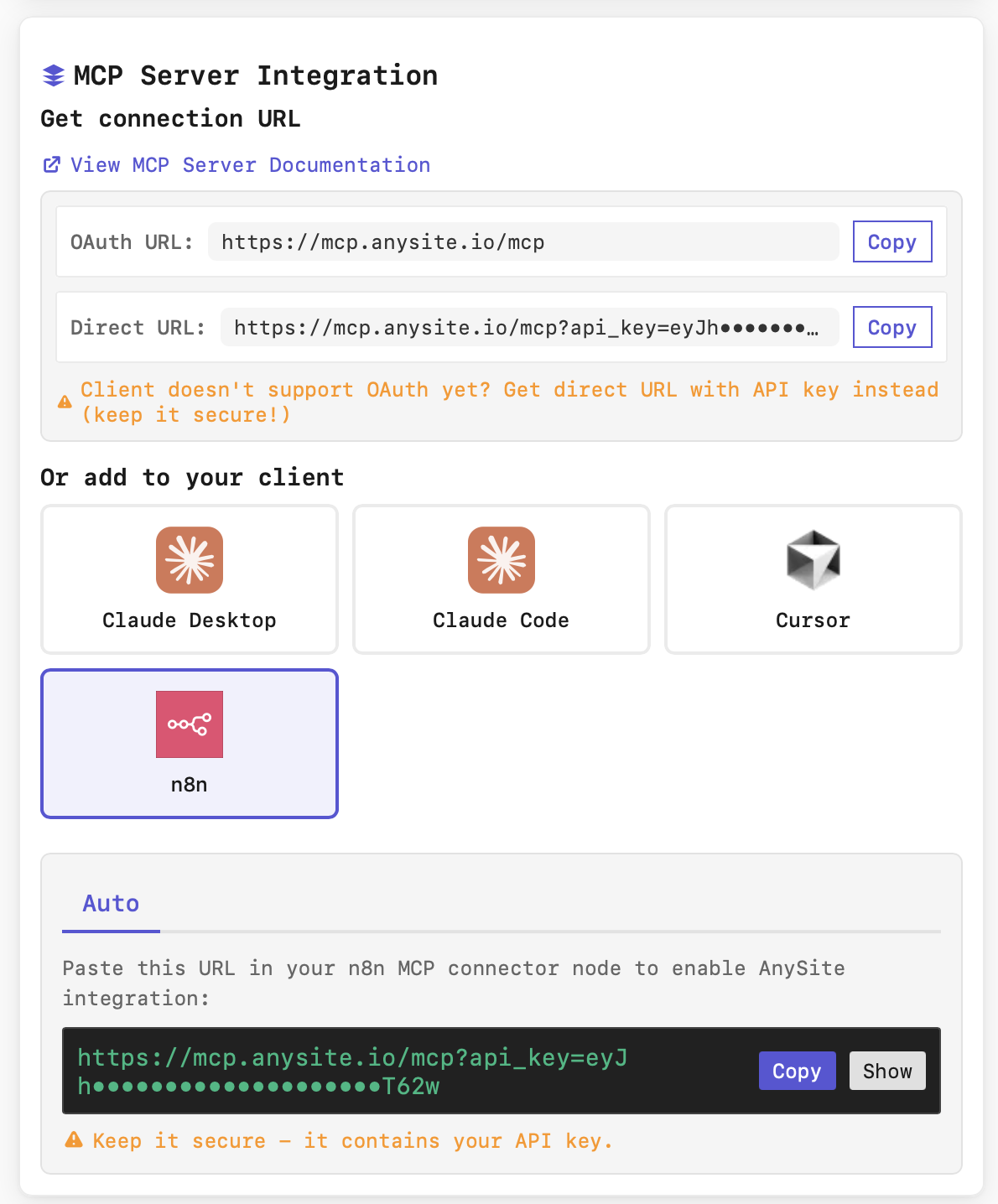
For n8n integration, use the Direct URL as it includes authentication credentials.
- In the "Or add to your client" section, select n8n
- The "Auto" tab will display your complete connection URL
- Click Copy to copy the URL (format:
https://api.anysite.io/mcp/direct?api_key=YOUR_KEY)
Keep your connection URL secure - it contains your API key. Never share it publicly or commit it to version control.
Step 2: Configure MCP Client in n8n
Now add the MCP Client node to your n8n workflow:
Add MCP Client Node
- Open your n8n workflow editor
- Search for "MCP Client" node and add it to your canvas
Configure Connection Parameters
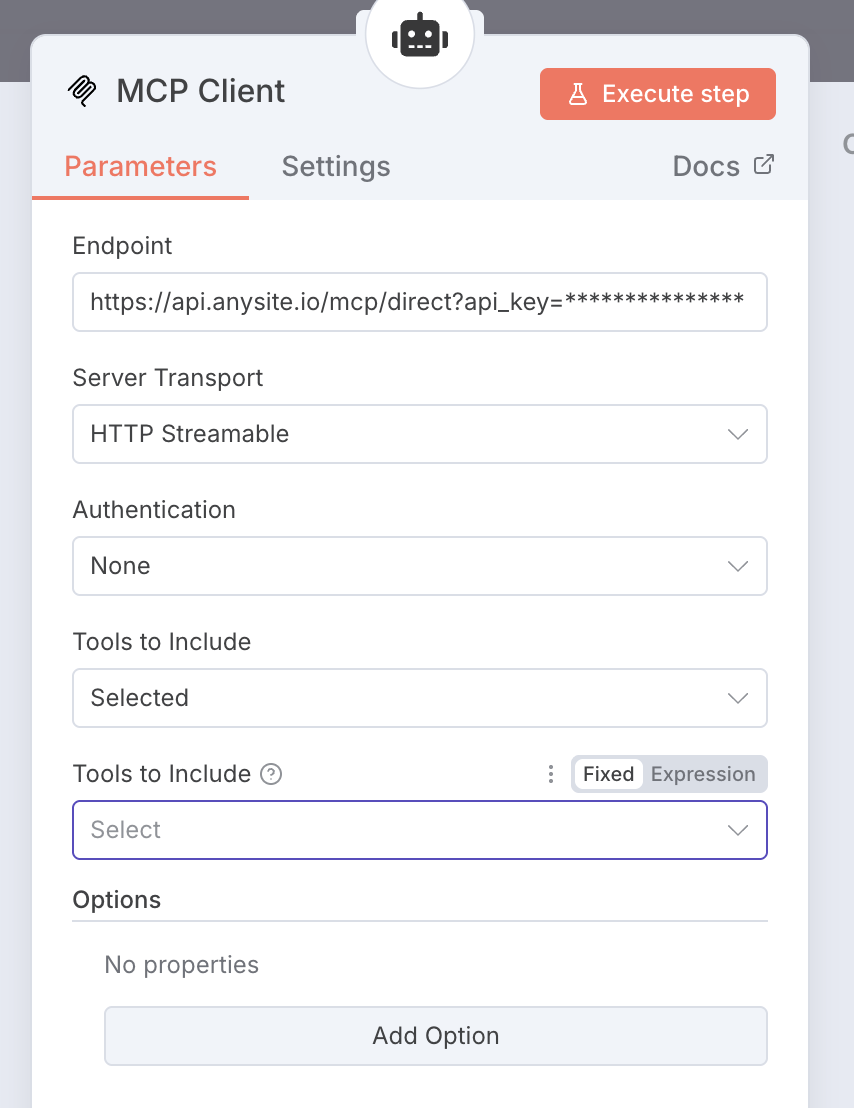
Set the following parameters in the node configuration:
Endpoint: Paste your Direct URL from Step 1
https://api.anysite.io/mcp/direct?api_key=YOUR_KEYServer Transport: Select
HTTP StreamableAuthentication: Select
None(Authentication is handled through the API key in the endpoint URL)Tools to Include:
- Select
Selectedif you want to use specific tools - Or leave as default to include all available tools
- Select
Select Tools (Optional)
If you chose "Selected" for Tools to Include, you can specify which Anysite tools to use:
linkedin_user- Extract LinkedIn profile datalinkedin_company- Get company informationlinkedin_post- Fetch post detailsinstagram_profile- Get Instagram profile datareddit_post- Extract Reddit post content- And more...
Step 3: Verify Connection
Test your MCP integration:
- Click Execute step in the n8n MCP Client node
- Check the execution log for successful connection
- You should see available tools listed in the output
If the connection is successful, you'll see a list of available Anysite tools that can be used in your workflow.
Example Workflow Structure
Here's a typical workflow structure using the Anysite MCP Tool:
Trigger (Webhook/Schedule)
  ↓
MCP Client (Anysite)
  ↓
AI Agent Node (uses MCP tools)
  ↓
Process Results
  ↓
Output/Store Data
Troubleshooting
Connection timeout or authentication errors
- Verify your API key is valid and active
- Check that your Anysite account has API access enabled
- Ensure the connection URL is complete and correctly copied
- Try regenerating the connection URL from the Anysite dashboard
MCP Client node not available
- Update n8n to the latest version (MCP support requires v1.0+)
- Check if MCP Client node is enabled in your n8n instance
- For self-hosted n8n, ensure all dependencies are installed
Tools not appearing or not working
- Verify your Anysite subscription includes the tools you need
- Check API rate limits and quota in your Anysite account
- Ensure the endpoint URL includes the `api_key` parameter
- Try reconnecting by updating the endpoint URL
HTTP Streamable transport issues
- Confirm "Server Transport" is set to "HTTP Streamable"
- Check network connectivity between n8n and api.anysite.io
- For self-hosted n8n, verify firewall rules allow outbound HTTPS
Security Best Practices
Secure Credentials
Never expose your API key. Use n8n environment variables or credentials management for sensitive data.
Access Control
Restrict n8n workflow access to authorized team members only.
Monitor Usage
Regularly check your Anysite dashboard for API usage and rate limits.
Rotate Keys
Periodically regenerate your API keys and update n8n configurations.