n8n AI Agent Integration
Connect Anysite MCP Server to n8n AI Agents for unlimited data extraction and workflow automation
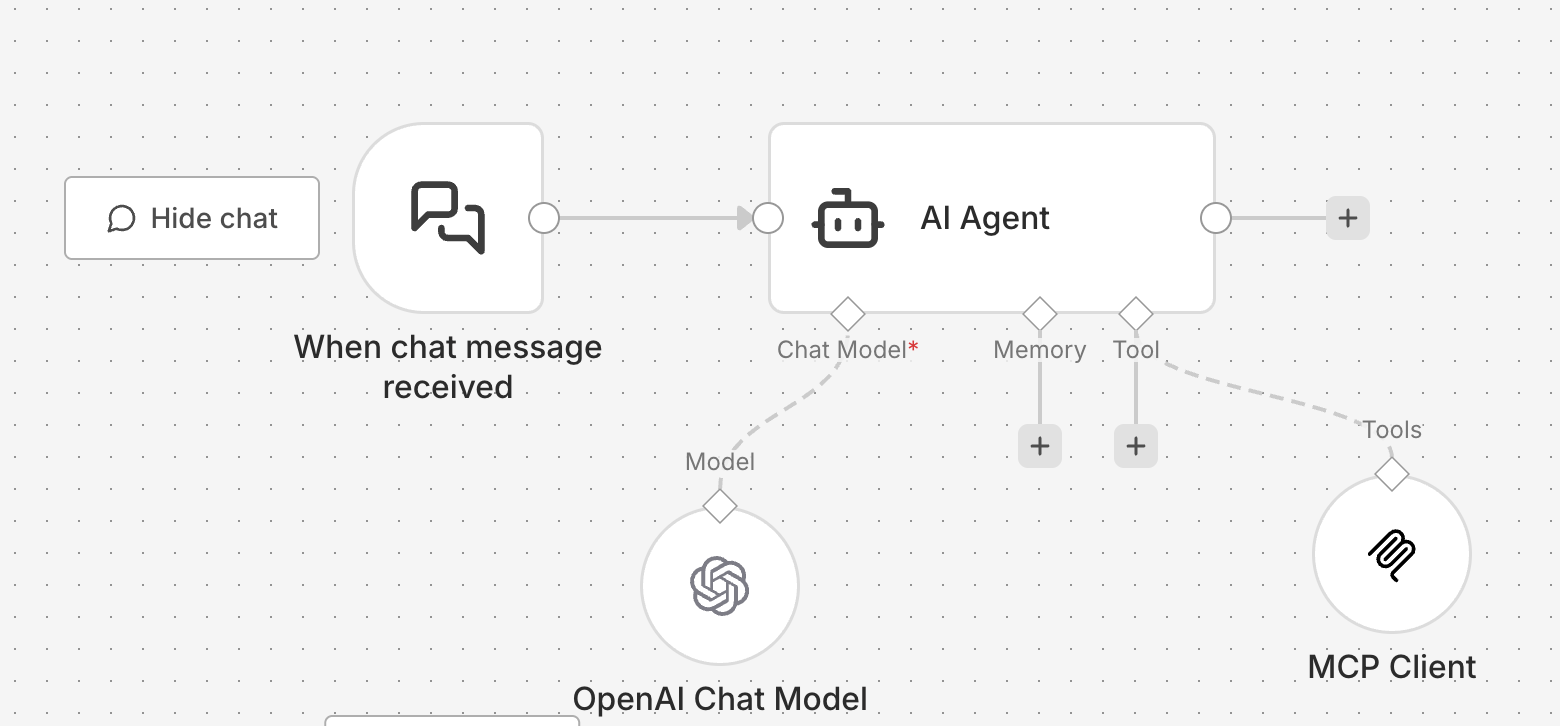
Overview
n8n AI Agents combined with Anysite MCP Server creates a powerful platform for building autonomous AI agents with unlimited access to social media data. With MCP Unlimited plan, your n8n AI Agents can extract data from LinkedIn, Instagram, Twitter, Reddit, YouTube, SEC filings, Y Combinator database, and more without any request limits - all integrated into your n8n workflows.
Perfect for:
- Autonomous research agents in workflows
- Lead enrichment and CRM automation
- Competitor monitoring workflows
- Multi-platform data aggregation pipelines
- Scheduled intelligence gathering with n8n cron
- AI-powered workflow automation
MCP Unlimited Plan Required: This integration requires an active MCP Unlimited subscription ($30/month) for unlimited data extraction.
Download Pre-Built Workflow
Download n8n AI Agent Workflow
Click to download the ready-to-use n8n AI Agent workflow with Anysite MCP integration
Workflow includes:
- Pre-configured AI Agent with MCP connection
- Example prompts and use cases
- Error handling and logging
- Ready-to-customize structure
Prerequisites
Before you begin, ensure you have:
- Self-hosted n8n instance or n8n.cloud account
- Anysite account with MCP Unlimited subscription
- Basic understanding of n8n workflows and AI Agent node
Step 1: Get Your MCP Connection URL
First, obtain your Direct URL from the Anysite dashboard:
Log in to Anysite
Visit [app.anysite.io](https://app.anysite.io) and sign in to your account
Navigate to MCP Integration
Go to the **MCP Server Integration** section in your dashboard
Copy Direct URL
<img
  src="/images/make_mcp/Screenshot8.11.27.png"
  alt="Anysite MCP Server Integration - Get Direct URL"
/>

You'll see two connection options:
- **OAuth URL**: `https://mcp.anysite.io/mcp`
- **Direct URL**: `https://mcp.anysite.io/mcp?api_key=YOUR_KEY`

Click **Copy** next to the **Direct URL** - this includes your API key for authentication.
Security Notice: Your Direct URL contains your API key. Keep it secure and never share it publicly or commit it to version control.
Step 2: Configure MCP in n8n AI Agent
Now connect the MCP Server to your n8n AI Agent node:
Create or Open Workflow
Open n8n and create a new workflow or open an existing one where you want to use the AI Agent.
Add AI Agent Node
1. Click the **+** button to add a new node
2. Search for **"AI Agent"** or **"@n8n/n8n-nodes-langchain.agent"**
3. Add the AI Agent node to your canvas
Configure MCP Connection
<img
  src="/images/n8n/n8n_mcp.png"
  alt="Configure MCP in n8n AI Agent"
/>

In the AI Agent node configuration:

1. Go to the **Tools** section
2. Click **Add Tool**
3. Select **MCP Tool** from the list
4. In the MCP Tool configuration:
   - **Server URL**: Paste your Direct URL from Step 1
     ```
     https://mcp.anysite.io/mcp?api_key=YOUR_API_KEY
     ```
   - **Name**: "Anysite MCP" (or any descriptive name)
5. Click **Save** or **OK**
Verify Connection
After saving, the MCP tools should appear in your AI Agent's available tools list. You can verify by:
- Looking at the Tools section - should show "5 tools available"
- Testing with a simple prompt in n8n's test mode
Connection successful! Your n8n AI Agent can now use Anysite MCP tools to extract data from any supported platform within your workflows.
Step 3: Configure Agent Behavior
After connecting MCP, configure your AI Agent to use it effectively:
System Prompt Example
You are an AI research agent integrated into an n8n workflow with access to Anysite MCP tools.
Use these tools to extract data from LinkedIn, Instagram, Twitter, Reddit, YouTube, SEC, and Y Combinator.

When the user requests information:
1. Identify the appropriate MCP tool(s) to use
2. Extract the data using the tools
3. Analyze and structure the information
4. Return JSON-formatted results for the workflow

Available platforms: LinkedIn, Instagram, Twitter, Reddit, YouTube, SEC EDGAR, Y Combinator, Web Parser

Always provide accurate, well-structured data that can be processed by subsequent workflow nodes.
Available Tools
Your n8n AI Agent now has access to 70+ tools including:
LinkedIn (27 tools)
- Profile extraction and search
- Company research and employee data
- Post and comment analysis
- LinkedIn messaging and chat
- Job listings and groups
Instagram (8 tools)
- Profile data and metrics
- Posts and reels extraction
- Comments and likes analysis
- Follower/following data
Twitter/X (5 tools)
- Profile information
- Tweet extraction and search
- User discovery
Reddit (5 tools)
- Post details and search
- Comments extraction
- User posts and comments
YouTube (5 tools)
- Video search and metadata
- Channel videos extraction
- Video details and engagement
- Video comments analysis
- Subtitle/transcript extraction
Y Combinator (3 tools)
- Company profiles by slug
- Search YC companies
- Search YC founders
SEC (2 tools)
- Search SEC EDGAR filings
- Retrieve SEC documents
Web Tools (3 tools)
- Webpage parsing
- Sitemap extraction
- Web search
View All Tools
Browse complete list of all 115+ available MCP endpoints
Use Cases & Examples
1. Lead Enrichment Workflow
n8n Workflow:
Webhook → AI Agent (MCP) → Enrich Contact → Save to CRM
Agent Prompt:
"Research {{$json.email}} on LinkedIn. Find their profile, current company,
job title, and recent activity. Return structured JSON."
What the agent does:
- Uses
find_linkedin_user_emailto find profile - Uses
get_linkedin_profileto extract details - Uses
get_linkedin_user_postsfor activity - Returns structured JSON to workflow
Workflow Output:
- Enriched contact data flows to next node
- Automatic CRM update
- Email personalization data ready
2. Competitor Monitoring Workflow
n8n Workflow:
Schedule (Daily) → AI Agent (MCP) → Format Report → Send to Slack
Agent Prompt:
"Monitor competitor 'TechCorp' on LinkedIn:
- Get last 7 days of posts
- Extract engagement metrics
- Identify trending topics
Return JSON with summary."
Tools used:
search_linkedin_companiesto find companyget_linkedin_company_postsfor recent posts- Agent analyzes and structures findings
Automation:
- Runs daily at 9 AM
- Automatic Slack notification
- No manual intervention needed
3. Multi-Platform Research Pipeline
n8n Workflow:
Manual Trigger → AI Agent (MCP) → Split Data → Parallel Processing → Merge Results → Output
Agent Prompt:
"Find all mentions of 'AI automation tools' across:
- LinkedIn (posts from last week)
- Twitter (tweets from last week)
- Reddit (discussions from last month)
- YouTube (videos from last 3 months)

Analyze sentiment and provide summary."
Tools used:
search_linkedin_postssearch_twitter_postssearch_reddit_postssearch_youtube_videos- Agent synthesizes multi-platform insights
4. SEC Financial Intelligence Workflow
n8n Workflow:
HTTP Request → AI Agent (MCP) → Extract Financial Data → Store in Database
Agent Prompt:
"Get latest 10-K and 10-Q filings for {{$json.company_name}}.
Extract key financial metrics, risk factors, and MD&A summary."
Tools used:
search_sec_companiesto find filingsget_sec_documentto retrieve full document- Agent parses and extracts structured data
Use case: Automated financial due diligence pipeline
5. Y Combinator Startup Research
n8n Workflow:
Airtable Trigger → AI Agent (MCP) → YC Research → Update Airtable
Agent Prompt:
"Research YC company {{$json.slug}}:
- Get company profile
- Find founders and backgrounds
- Identify batch and status
Return structured data for database."
Tools used:
get_yc_companyfor company profilesearch_yc_foundersfor team data- Structured output for Airtable update
Integration with n8n Workflows
Basic Workflow Structure
Typical n8n workflow with AI Agent:
- Trigger - Webhook, Schedule, or Manual trigger
- AI Agent - Processes request using MCP tools
- Process Results - Code or Set node to structure data
- Output - Send to CRM, Database, Slack, or Email
Multi-Agent Setup
For complex workflows, use multiple AI Agents:
- Research Agent - Gathers data using MCP tools
- Analysis Agent - Processes and analyzes the data
- Merge & Report - Combines insights and generates output
Error Handling
Implement robust error handling:
- Use IF node after AI Agent to check success
- Create separate paths for success and error cases
- Log errors to database or send notifications
- Implement retry logic for failed operations
n8n-Specific Features
1. Expression Integration
Access AI Agent results in n8n expressions:
// Get data from previous AI Agent node
{{ $json.research_results }}

// Access specific fields
{{ $json.linkedin_profile.name }}
{{ $json.company_data.employee_count }}
2. Loop Through Results
Process multiple items with AI Agent using n8n's loop functionality:
- Split In Batches - Divide input data into manageable chunks
- AI Agent - Process each item with MCP tools
- Aggregate Results - Combine all processed data
3. Conditional Tool Usage
// In AI Agent system prompt
"If the request is about LinkedIn, use linkedin_* tools.
If it's about SEC filings, use search_sec_companies and get_sec_document.
If it's about YouTube, use youtube_* tools.
Always choose the most appropriate tool for the data source."
4. JSON Output for Workflow
Configure your agent to return structured JSON:
"Return your findings as JSON with this structure:
{
  'summary': 'Brief overview',
  'data': { extracted data },
  'sources': ['tool1', 'tool2'],
  'timestamp': 'ISO format'
}
"
This makes it easy to process results in subsequent n8n nodes.
Workflow Templates
Lead Enrichment Pipeline
Download: Use the workflow from the link above
Flow:
- Webhook - Receives email/name/company
- AI Agent (MCP) - Enriches with LinkedIn data
- Code Node - Structures and validates data
- HubSpot/Salesforce - Updates CRM
- Slack - Notifies team
Daily Competitor Report
Trigger: Schedule node (daily 9 AM) AI Agent Prompt:
"Monitor these 3 competitors on LinkedIn:
- Company A
- Company B
- Company C

For each, get:
- Last 5 posts
- Engagement metrics
- Employee growth trends

Return JSON report."
Output: Formatted email with insights
Social Media Intelligence
Trigger: Manual trigger AI Agent Prompt:
"Research {{$json.topic}} across all platforms:
- LinkedIn posts (last week)
- Twitter mentions (last week)
- Reddit discussions (last month)
- YouTube videos (last 3 months)

Analyze sentiment and trends."
Output: Comprehensive multi-platform report
Troubleshooting
MCP tools not available in AI Agent
**Possible causes:**
- MCP Server URL not configured correctly
- MCP Unlimited plan not active
- n8n AI Agent node version too old

**Solutions:**
- Verify Direct URL includes `?api_key=YOUR_KEY` parameter
- Check MCP Unlimited subscription at [app.anysite.io](https://app.anysite.io)
- Update n8n to latest version (MCP support added in recent releases)
- Test MCP connection outside AI Agent first
Connection fails or times out
**Possible causes:**
- Invalid or expired API key
- Network connectivity issues from n8n instance
- Firewall blocking MCP server

**Solutions:**
- Regenerate Direct URL from Anysite dashboard
- Check n8n instance can reach `mcp.anysite.io`
- Verify no firewall rules blocking outbound HTTPS
- Test with curl from n8n server: `curl https://mcp.anysite.io/mcp?api_key=YOUR_KEY`
Agent doesn't use MCP tools
**Possible causes:**
- System prompt doesn't mention tools
- Agent not configured to use tools
- Tool permissions not set

**Solutions:**
- Update system prompt to explicitly mention MCP tools
- Ensure "Allow Agent to use tools" is enabled in node settings
- Test with direct tool invocation: "Use get_linkedin_profile tool for..."
- Check n8n AI Agent configuration has tools enabled
Rate limits or quota errors
**Note:** With MCP Unlimited, you should have no rate limits for MCP requests.

**If you see errors:**
- Verify you're on MCP Unlimited plan (not pay-per-use)
- Check subscription status in Anysite dashboard
- Direct API calls (outside MCP) are billed separately
- Contact support if issues persist
Workflow execution fails
**Common issues:**
- Agent response too large for n8n memory
- Timeout on long-running research
- JSON parsing errors

**Solutions:**
- Limit data extraction in agent prompt (e.g., "Get last 10 posts, not 100")
- Increase timeout in AI Agent node settings
- Use n8n Code node to validate and clean JSON output
- Split large research into multiple agent calls
Security Best Practices
Protect API Keys
Never expose your Direct URL in:
- Shared workflows (export anonymized versions)
- Public n8n templates
- Screenshots or documentation
- Version control systems

Use n8n credentials store for sensitive data.
Agent Access Control
Limit agent permissions:
- Only enable necessary tools
- Use separate API keys for different workflows
- Monitor execution logs in n8n
- Set up error notifications
Data Privacy
Handle extracted data responsibly:
- Follow GDPR and data protection laws
- Don't store sensitive data unnecessarily
- Implement data retention policies in workflows
- Respect platform terms of service
Monitor Usage
Track your workflow activity:
- Review n8n execution logs regularly
- Check Anysite dashboard for usage patterns
- Set up n8n error workflows
- Monitor API response times
Benefits of n8n + MCP Integration
Unlimited Data Access
With MCP Unlimited ($30/month), extract as much data as you need without worrying about request limits or overage charges.
Workflow Automation
Integrate AI intelligence directly into your automation workflows. Combine data extraction with processing, storage, and notifications.
Multi-Platform Intelligence
Single AI Agent can access LinkedIn, Instagram, Twitter, Reddit, YouTube, SEC, YC, and web data - unified intelligence gathering in one workflow.
Self-Hosted Control
Run n8n on your infrastructure with full control over data, security, and compliance while accessing unlimited external data via MCP.
Open Source Flexibility
n8n's open-source nature allows complete customization of workflows, data processing, and integration patterns.
Visual Workflow Builder
Build complex AI-powered workflows visually without coding. Connect MCP intelligence to 400+ n8n integrations.
Advanced Integration Patterns
1. Multi-Agent Research Pipeline
Use multiple AI Agents in sequence, each specialized:
Trigger
  → Agent 1: LinkedIn Research (MCP)
  → Agent 2: Twitter Sentiment (MCP)
  → Agent 3: Synthesis & Analysis
  → Send Report
Each agent focuses on specific platform, final agent combines insights.
2. Conditional Data Enrichment
Input Data
  → IF node (has LinkedIn URL?)
      → Yes: AI Agent extracts LinkedIn data
      → No: AI Agent searches by email/name
  → Merge results
  → Continue workflow
3. Feedback Loop with Memory
Get Task
  → AI Agent (MCP): Initial Research
  → Store in n8n Database
  → IF: Need more data?
      → Yes: AI Agent (MCP): Deep Dive
      → Loop back
  → Final Output
Agent uses MCP tools iteratively until satisfied with data quality.
4. Real-Time Monitoring
Schedule (Every hour)
  → AI Agent: Check for new posts/filings
  → IF: Found new content?
      → Process and alert
      → Update tracking database
  → Sleep until next run
n8n Workflow Best Practices
Optimize Agent Prompts for n8n
Do:
- Request JSON output format for easy processing
- Specify exact field names needed downstream
- Set clear data limits (e.g., "Get 10 posts, not all")
- Include error handling instructions
Example:
"Search LinkedIn for 'data engineers' in Berlin.
Return JSON array with exactly these fields:
- name, title, company, profile_url
Limit to 20 results."
Handle Large Datasets
Strategies:
- Use pagination in agent prompts
- Split large extractions into multiple agent calls
- Process results in batches using Loop node
- Store intermediate results in n8n database
- Use n8n's SplitInBatches node for chunking
Error Recovery
Implement retry logic:
- Wrap AI Agent in Error Trigger node
- Retry failed executions automatically
- Log errors to database/Slack
- Fallback to manual review queue
- Use n8n's built-in error workflows
Performance Optimization
Tips:
- Cache frequently accessed data in n8n variables
- Use AI Agent for intelligence, not simple lookups
- Parallel execution for independent research tasks
- Optimize MCP tool timeouts (default 300s often enough)
- Use n8n Queue mode for high-volume processing
Next Steps
Download Workflow Template
Get the pre-built n8n workflow to start immediately
View All MCP Tools
Explore the complete list of 70+ tools available for your agents
MCP Unlimited Plan
Learn more about MCP Unlimited benefits and pricing
Dashboard
Manage your subscription and monitor usage
n8n Documentation
Learn more about n8n workflow automation
n8n Community
Join n8n community for workflow ideas and support
Support
Need help with n8n + MCP integration?
Email Support
Get technical assistance from our team
MCP Documentation
Browse complete MCP documentation
n8n Nodes
Also check our n8n community nodes for direct API integration
GitHub
Access workflow templates and examples
Ready to supercharge your n8n workflows? Connect Anysite MCP to your AI Agents and unlock unlimited data extraction with the power of automation!